The best VoiceInk alternatives for Mac in 2026
VoiceInk is open source and cheap. People look elsewhere when other voices get typed, when they speak more than one language, or when they want more than dictation. Speechy keeps your voice on your Mac and also answers from your apps. We make Speechy, so it is listed first.
Short answer
Want more than dictation? Speechy: dictation that stays on your Mac, plus answers from Gmail, Outlook, Calendar, Finder and 1,000+ apps. Free: Apple Dictation, or Spokenly's local models.
Ask your apps
Ask a question, get the answer from your own apps
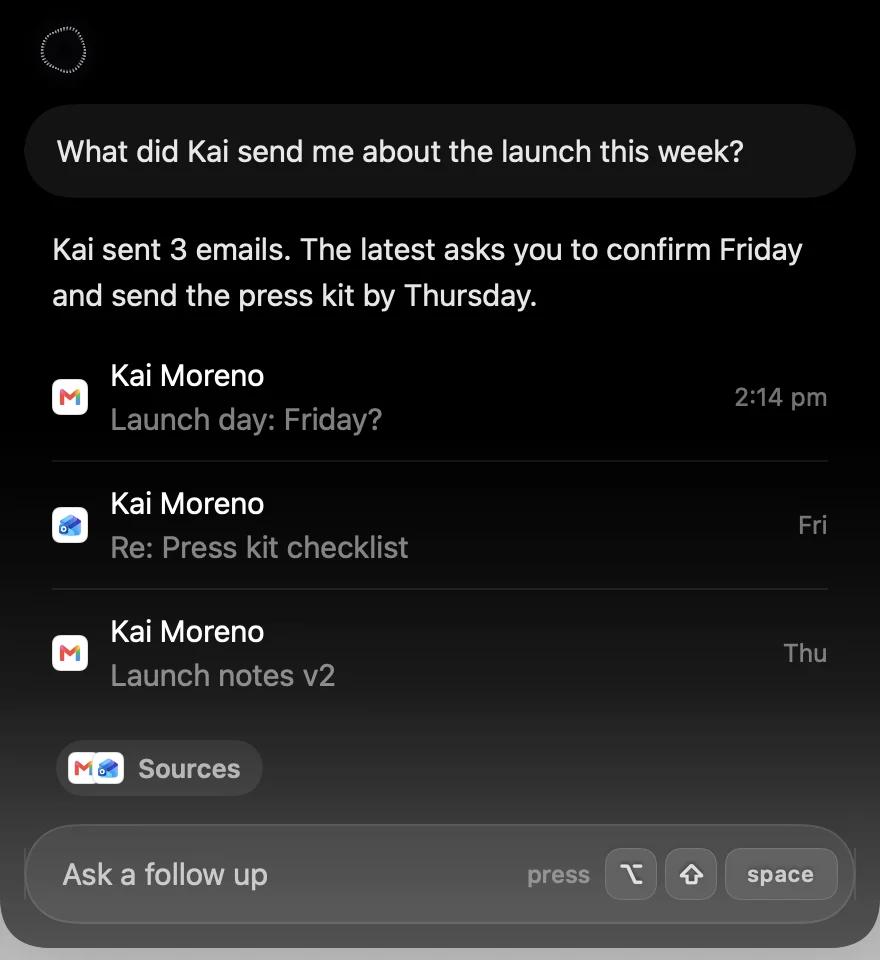
Press ⌥⇧Space and ask. Speechy looks in Gmail, Outlook, Calendar, Slack, Notion, Music, Finder and 1,000+ more apps, and answers in the notch with the emails, events or files it found.







 + 1,000 apps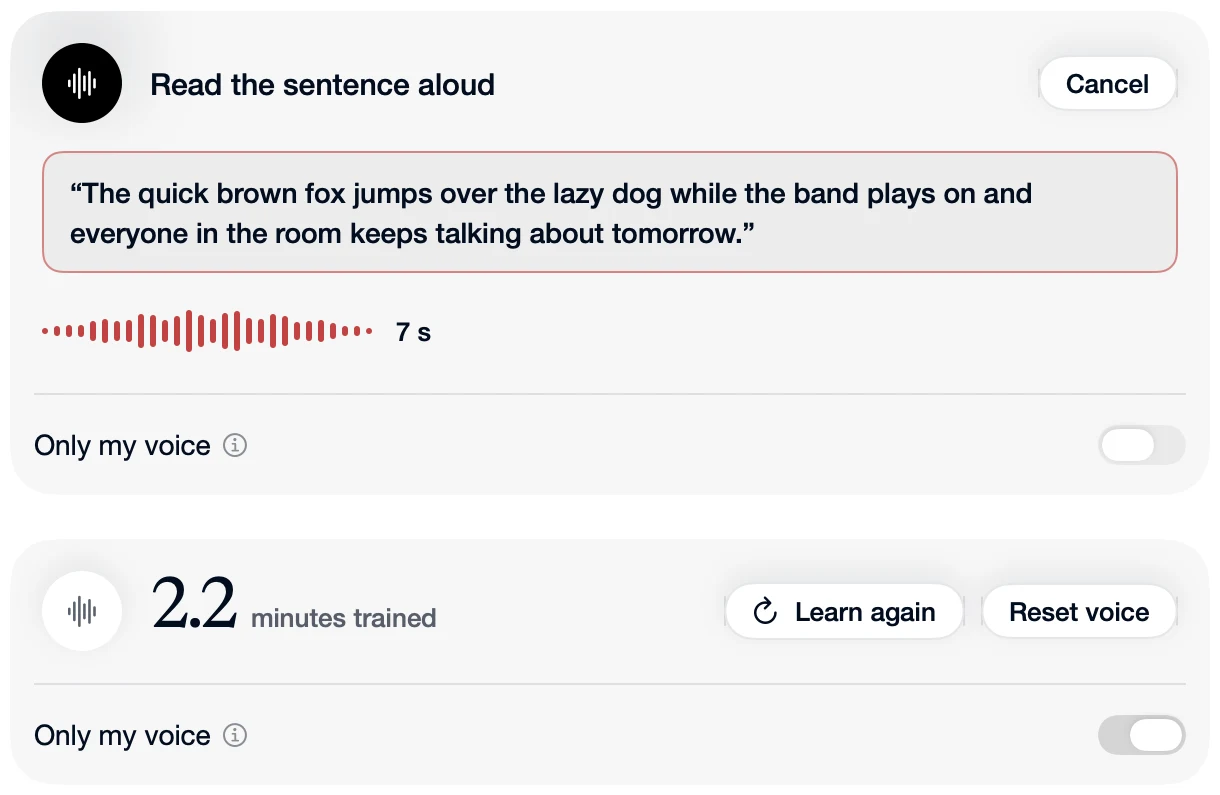
Private voice
Your voice is turned into text on your Mac
Nothing you say is uploaded to be transcribed. Turn on Only My Voice and Speechy learns how you sound, leaves out other voices nearby, and keeps learning as you use it, all on your Mac.
Asking your apps sends your question as text to the AI that answers it. Your voice recording stays on your Mac.
VoiceInk is a great answer to "why pay for dictation?": open source, on your Mac, $25 once. People look for an alternative when other voices around them get typed, when they speak more than one language, or when they want more than dictation.
Side by side
| App | Answers from your apps | Where your voice goes | Price |
|---|---|---|---|
 Speechy Speechy | Yes, 1,000+ apps | Your Mac, always | From $99 once, or $12.99 a month |
 VoiceInk VoiceInk | No | Your Mac, or cloud with your own key | $25 once |
| Apple Dictation | No | Your Mac for some languages | Free |
 Spokenly Spokenly | No | Cloud by default, local optional | Free locally, $29 once, or $9.99 a month |
 Superwhisper Superwhisper | No | Cloud by default, local optional | $8.49 a month, or $249.99 once |
 Wispr Flow Wispr Flow | A few: Gmail, Calendar, Slack | Cloud, always | $15 a month, or $12 billed yearly |
1. Speechy: best if you want more than dictation
Speechy turns your voice into text on your Mac, and also answers from the apps you connect. Press ⌥⇧Space and ask “what did Kai send me about the launch?”, “what’s on tomorrow?” or “open my Downloads folder”, and the answer appears in the notch with the emails, events or files it found. It works with Gmail, Google Calendar, Outlook, Slack, Notion, GitHub, Linear and 1,000+ more apps, plus Mail, Calendar, Reminders, Notes, Messages, Music and Finder on your Mac. You sign in to each app once, in your browser.
It can act too. Ask it to email someone and you see Gmail’s own compose window in the notch: check it, change a word, then send, with a few seconds to undo. You choose what each app may do on its own, what asks first, and what never happens.
Dictation never leaves your Mac. Hold Fn, speak, and clean text lands where your cursor is. All 15 speech models run on your Mac’s chip, so dictation works offline, and your words show in a small pill while you talk. Turn on Only My Voice and Speechy learns how you sound, leaves out other voices nearby, and keeps learning as you use it, on your Mac.
Best for: people who want private dictation, and one shortcut that also finds, answers and does things in their apps.
Price: Lifetime from $99, or Pro at $12.99 a month. Try Pro free for 3 days.
Needs: a Mac with Apple silicon and macOS 14 or later.
2. Apple Dictation: best free option
Already on your Mac, and free. Press the Dictation shortcut, speak into any text field, and press it again to stop. Some languages are transcribed on your Mac. On macOS 27, Macs with an M3 or later and 12 GB of memory get Apple's newer dictation, which adds punctuation and formatting. There is no custom vocabulary, and it stops after 30 seconds of silence.
Best for: trying dictation before you pay for anything.
Price: free.
3. Spokenly: best free local models
Free when you use its local models, on Mac, Windows, Linux and iPhone. Its default models are in the cloud, and AI cleanup of your text comes through Pro, Apple Intelligence or your own key. On the Mac it can also run quick actions, like opening an app or a website.
Best for: free dictation on many platforms.
Price: free locally, $29 once for Local+, or Pro at $9.99 a month.
4. Superwhisper: best for local or cloud models on every platform
Many local and cloud models, Modes that run your own AI prompts, meeting recording and file transcription, on Mac, Windows, iPhone and Android with one license. Its docs start you on its own cloud models, and its best local models need Pro.
Best for: people who want deep control over models and prompts, on every device.
Price: a free plan with local Whisper models, Pro at $8.49 a month, $84.99 a year, or $249.99 once.
5. Wispr Flow: best for dictation on every device
The best known dictation app. It cleans up your words well and runs on Mac, Windows, iPhone and Android, with team plans and meeting notes. Everything is transcribed in the cloud, so dictation needs a connection, and using your dictations to improve its models is on by default on Free and Pro. Its connectors bring Gmail, Calendar and Slack into its meeting notes and questions.
Best for: people who dictate on Windows or their phone as much as on a Mac.
Price: a free plan that slows down after 2,000 words a week, or Pro at $15 a month, or $12 a month billed yearly.
Speechy vs VoiceInk, in detail
VoiceInk is a great answer to "why pay for dictation?": it is open source, runs on your Mac and costs $25 once. Speechy also keeps your voice on your Mac. The difference is everything around the words. Here it is, with real examples.
At a glance
| Speechy | VoiceInk | |
|---|---|---|
| Answers from your apps | Gmail, Outlook, Calendar, Finder and 1,000+ apps | No |
| Where your voice is transcribed | On your Mac | On your Mac, or a cloud service with your own key |
| Your words while you speak | Yes, with Parakeet | Yes, with streaming models |
| Two languages in one dictation | Yes, detected after each pause | Language is set per mode |
| Ignores other people's voices | Yes, with Only My Voice | No, it is an open request |
| Claude Code and Codex | Questions, permissions and plan limits in your notch | No agent inbox |
| Price | Lifetime from $99, or Pro at $12.99 a month | $25 once for 1 Mac, free if you build it yourself |
| Needs | macOS 14 or later, Apple silicon | macOS 15 or later, Apple silicon for local models |
Only your voice gets typed
This is the one VoiceInk users keep asking for. A "speaker lock" request is open on its GitHub, and earlier requests to tell speakers apart were closed as not a focus.
Speechy has it today. Read one sentence aloud for about 10 seconds and turn on Only My Voice. Speechy then leaves out words from the colleague behind you, the TV or a speakerphone, and keeps learning your voice as you use it. Someone talking over you at the same moment can still slip through, but everyday background chatter does not.
Only My Voice: read one sentence aloud and Speechy learns your voice
Switch languages mid-dictation
In VoiceInk, the language belongs to a mode, so you set it per app or per shortcut. In Speechy, pick your languages and turn on Multiple languages in one dictation. Speechy works out the language again after each pause, so you can move between languages without changing anything.
With Hindi and English picked. Speechy mixes English, Spanish, French, German, Italian, Portuguese, Dutch, Hindi, Japanese and Chinese.
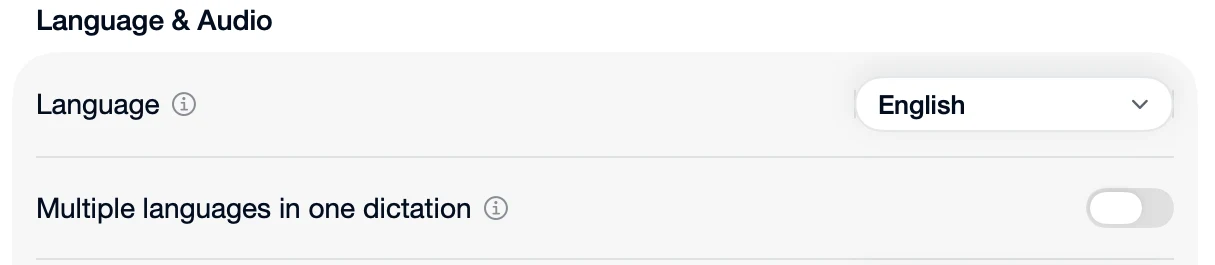 Speechy's language settings, with Multiple languages in one dictation
Built for Claude Code and Codex
VoiceInk can send your text through a coding CLI to clean it up, but it has nothing for answering your agents. Speechy puts Claude Code and Codex in your Mac's notch:
- Answer without switching windows. When an agent asks a question, wants permission to run a command or shows you a plan, it lands in the notch. Press 1 to allow or 2 to deny, J and K to move between them and E to clear one. Answered too fast? Esc takes it back within 2 seconds.
- Watch your plan limits. Your Claude and Codex usage sits beside the camera, read straight from the tools, with no keys to paste. The Usage tab shows the 5 hour and weekly windows.
- Talk to an agent by name. Hold the key and say "api, run the migration again on staging", and it goes to that project's agent.
- Read replies right there. Replies show formatted, with tables and code. Drop in up to 6 images, or drag the corner to make the chat bigger.
- Name files out loud. Turn on Reference coding files, and the file names you say become @file references in Claude Code for VS Code.
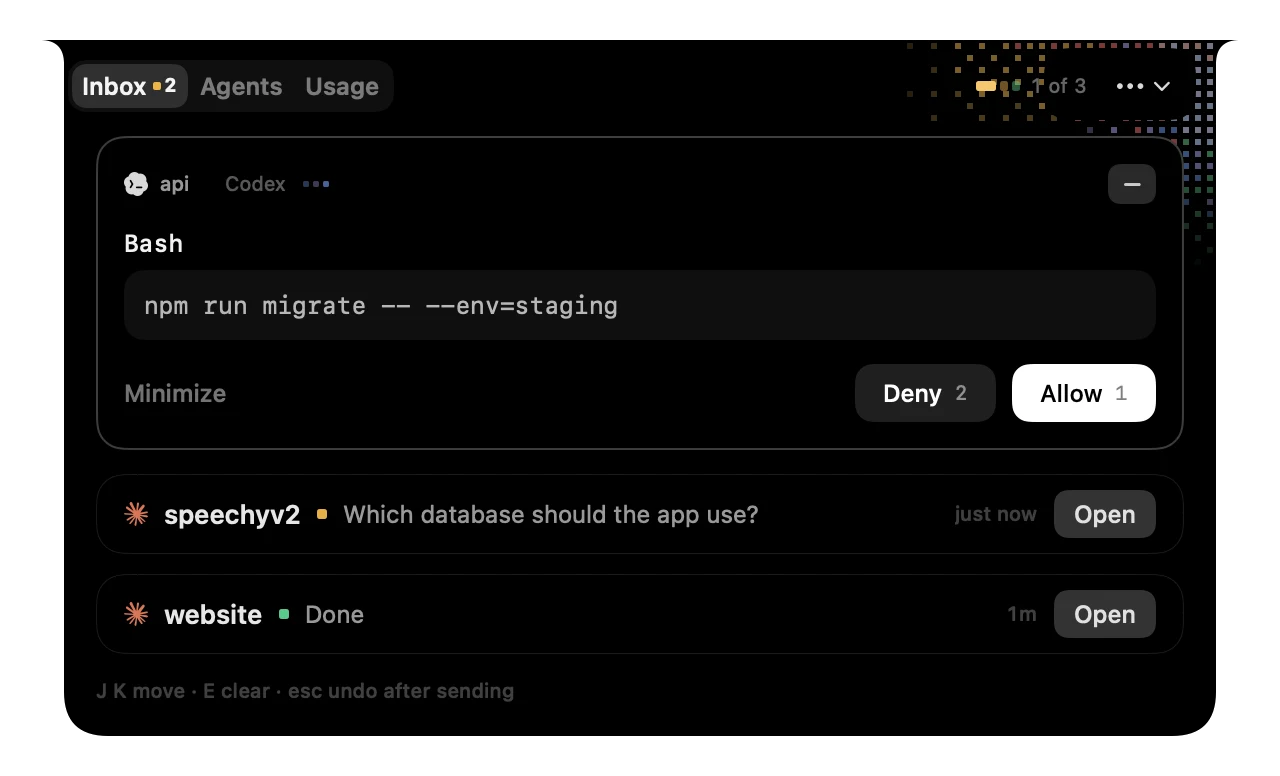 A Codex permission request in Speechy's notch, with Allow and Deny
 Claude and Codex plan usage beside the camera
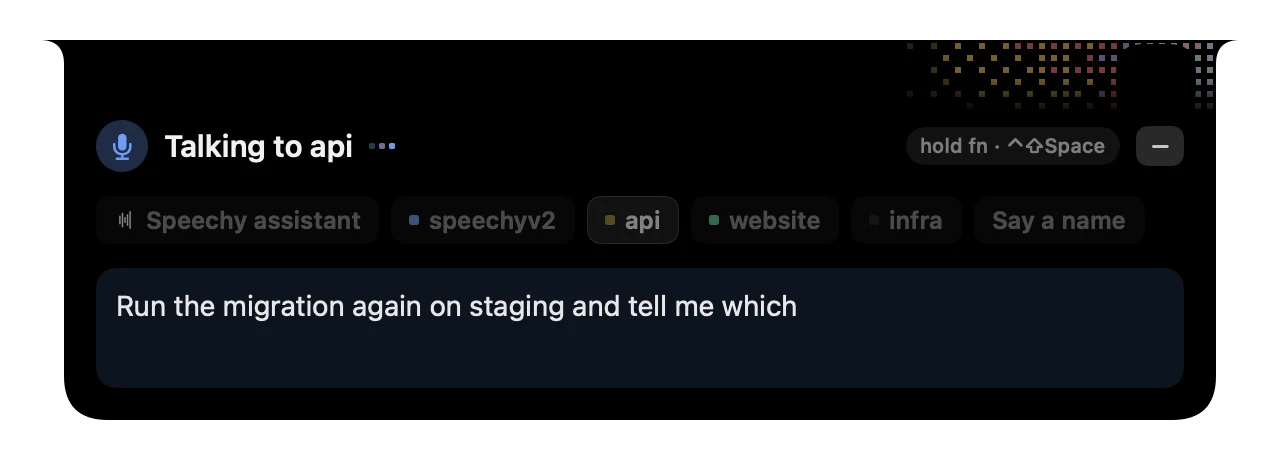 Talking to the api agent from Speechy's notch
Everything else Speechy does
Here is the rest of Speechy, with real examples. Every "Speechy types" box is the app's own output for that sentence, taken from Speechy's test suite. All of it runs on your Mac, with no AI provider or API key to set up.
It cleans up the way people talk
It keeps up when you change your mind
Say "sorry", "I mean", "make it" or "or rather", and Speechy swaps the old time, date, amount or name for the new one. "Make it work" and "sorry I'm late" are left alone.
Lists, without touching the keyboard
Count your points out loud, or say "bullet", and Speechy writes the list. In Mail, Notes, Pages and Word the dashes become bullets.
Numbers, money and times, written properly
Punctuation and new lines when you ask
Emails come out shaped like emails
Start with a greeting and end with a sign-off, and Speechy puts each on its own line. It skips this in chat apps, terminals and code editors.
Your words, spelled your way
Add names and jargon to your dictionary, fix a word Speechy keeps mishearing with a replacement (in every app, or only in one), and save snippets for things you say often. Say "insert" and the snippet's name.
With a snippet called "my address" saved.
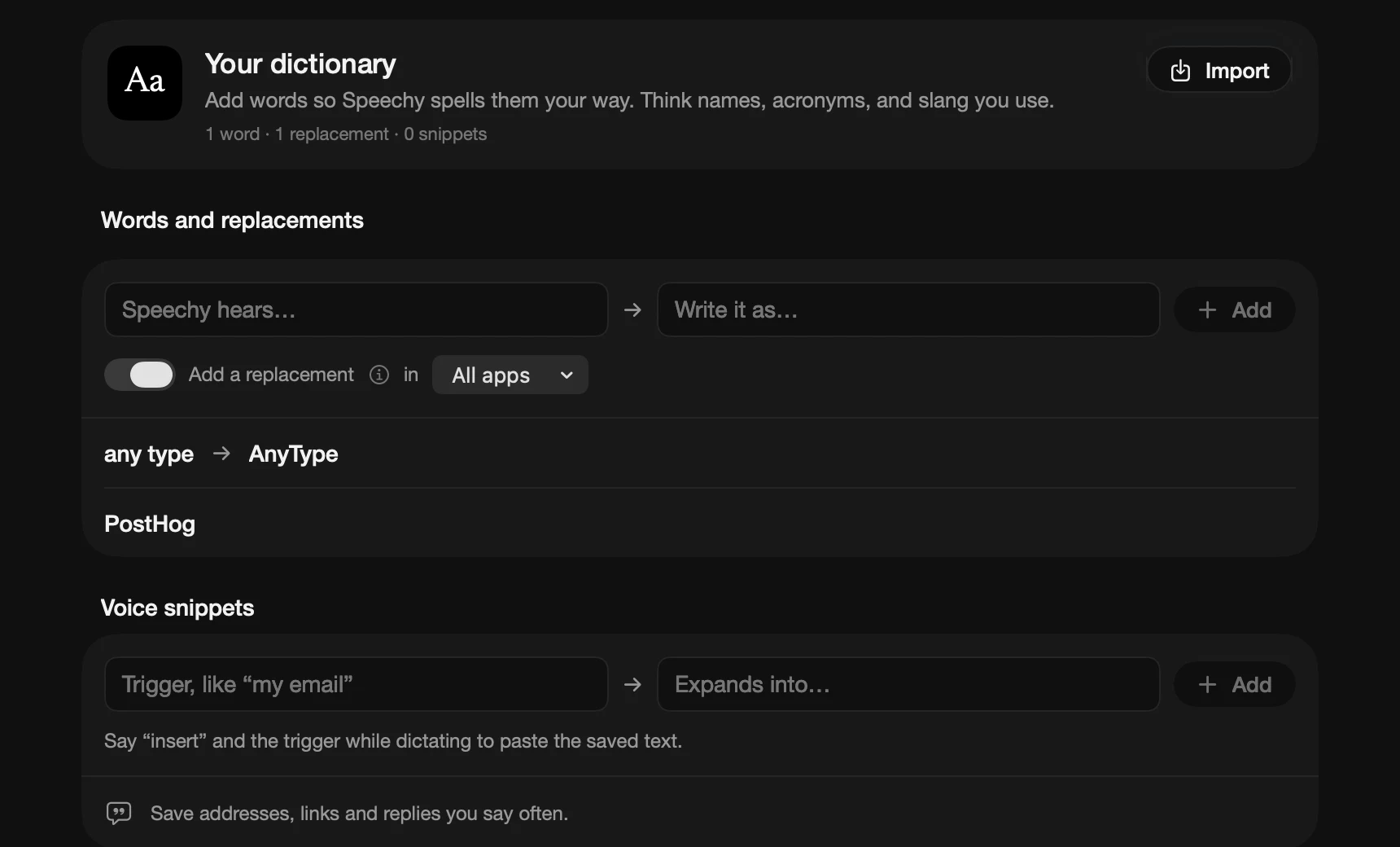 Speechy's dictionary: words, replacements and voice snippets
It spells what is on your screen
With App Context on, the names in the window you are dictating into become spelling hints. It stays on your Mac, password fields are always skipped, and you can leave out any app.
With DictationController.swift on screen.
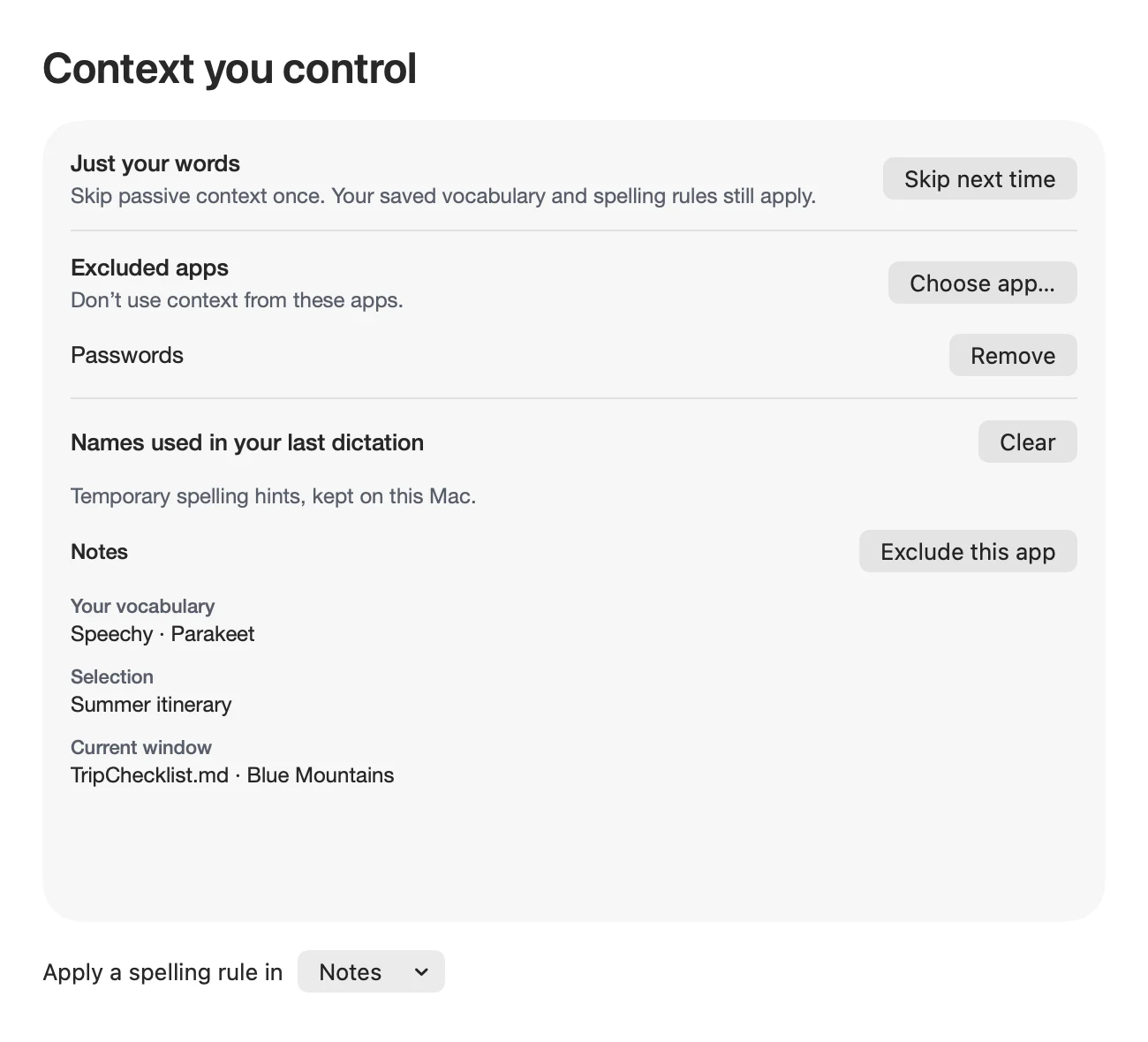 Context you control: the names Speechy used from your screen, and the apps it leaves out
Undo a dictation, or throw one away
Press ⌘⌥Z within five minutes and Speechy removes the last dictation and puts back anything it replaced. Press ⌘Esc while talking to drop the take, so nothing is typed or saved.
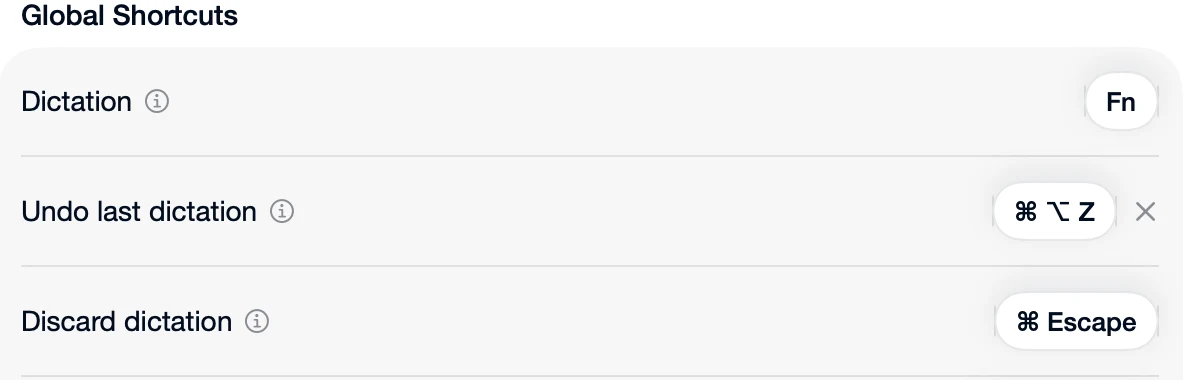 Speechy's shortcuts: Fn to dictate, ⌘⌥Z to undo, ⌘Esc to discard
Paste, type or just copy, and send
Speechy pastes by default, then puts your clipboard back the way it was. It can type the words out instead, or leave them on the clipboard. Turn on Auto submit and it presses Enter (or ⌘Enter) for you.
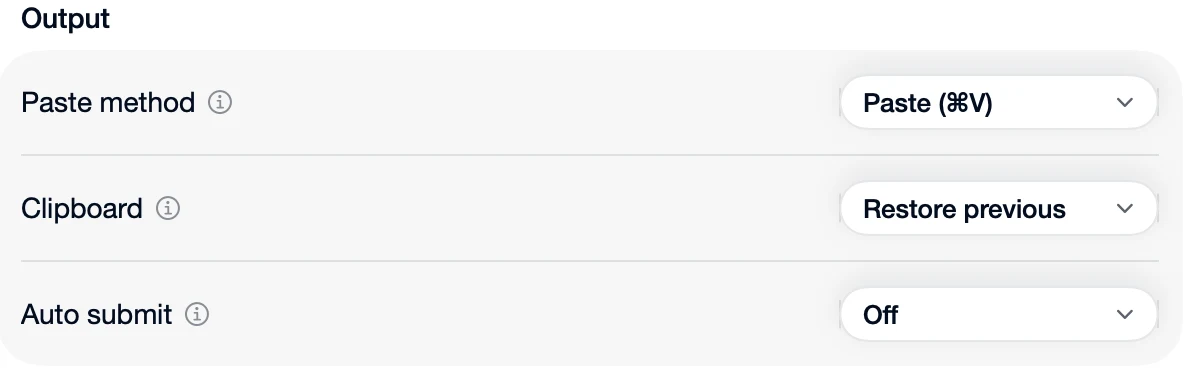 Speechy's output settings: paste method, clipboard and auto submit
Pick your look
Speechy shows a small pill while you speak: a compact pill, a wide pill with your words, a Dynamic Island style bar or a one-line ticker.
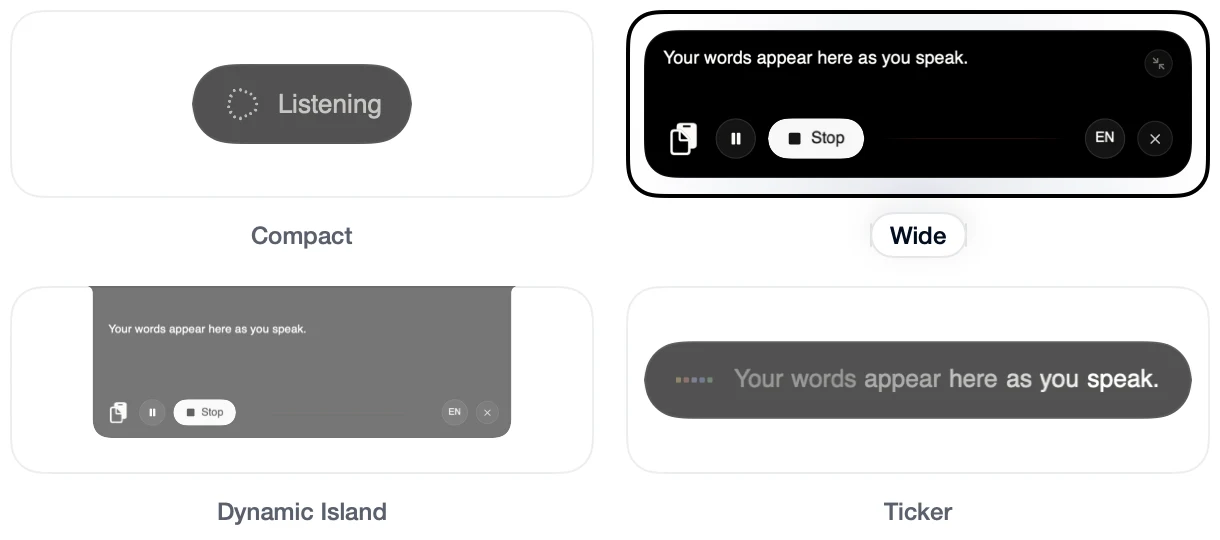 Speechy's four recording styles: Compact, Wide, Dynamic Island and Ticker
And more
- Music pauses while you talk, then carries on, with Background audio set to Pause media.
- Help when the mic is wrong: if Speechy hears nothing, it plays your recording back and opens the microphone picker in one click.
- Stats for your speed, streaks, golden hour and time saved, and a Speechy pass you can share.
- Light on memory: models free about 1.2 GB after 15 minutes idle and reload as you start talking.
- A whole email from one sentence with Smart Polish on: "draft an email to Sarah saying the deck is delayed to Thursday".
- Bring your dictionary from Wispr Flow, Superwhisper, Monologue, Aqua Voice or Willow Voice.
Where VoiceInk is better
- Price. $25 once for one Mac, $39 for two, $49 for three, and a 14-day refund window. Speechy Lifetime starts at $99.
- Open source. Anyone can read the code, and you can build it yourself for free.
- More models. Many local models, plus cloud services with your own API keys.
- Modes. Different settings switch on by app, website or spoken word.
- An iPhone app.
The short version
If you want the cheapest good local dictation, or open source matters to you, stay with VoiceInk. Choose Speechy if other voices around you get typed, if you speak more than one language, or if you want one shortcut that also answers from Gmail, Outlook, Calendar, Finder and 1,000+ apps.
VoiceInk details checked again on 20 October 2026 on its pricing page, docs and GitHub. Prices and features change, so check their site before you decide. The other apps were checked the same day on their own sites.