







How to choose
Three questions sort these apps quickly.
- Where does your voice go? Some apps transcribe on your Mac, some send your audio to their servers, and some let you choose. On-device apps work offline and keep what you say private.
- How do you want to pay? Free, monthly, or once. Several apps here have a one-time price.
- Do you only want text? Most of these apps just turn your voice into text. Wispr Flow connects to Gmail, Calendar and Slack for its meeting notes. Speechy answers from 1,000+ apps and the apps on your Mac: ask about an email, a meeting or a file, and get it back in the notch.
Speechy: dictation, plus answers from your apps
Hold Fn, speak, and clean text lands where your cursor is. Every word is transcribed on your Mac with one of 15 on-device speech models, so dictation works offline, and your words show in a small pill while you talk. Turn on Only My Voice and Speechy learns how you sound, leaves out other voices nearby, and keeps learning as you use it, on your Mac.
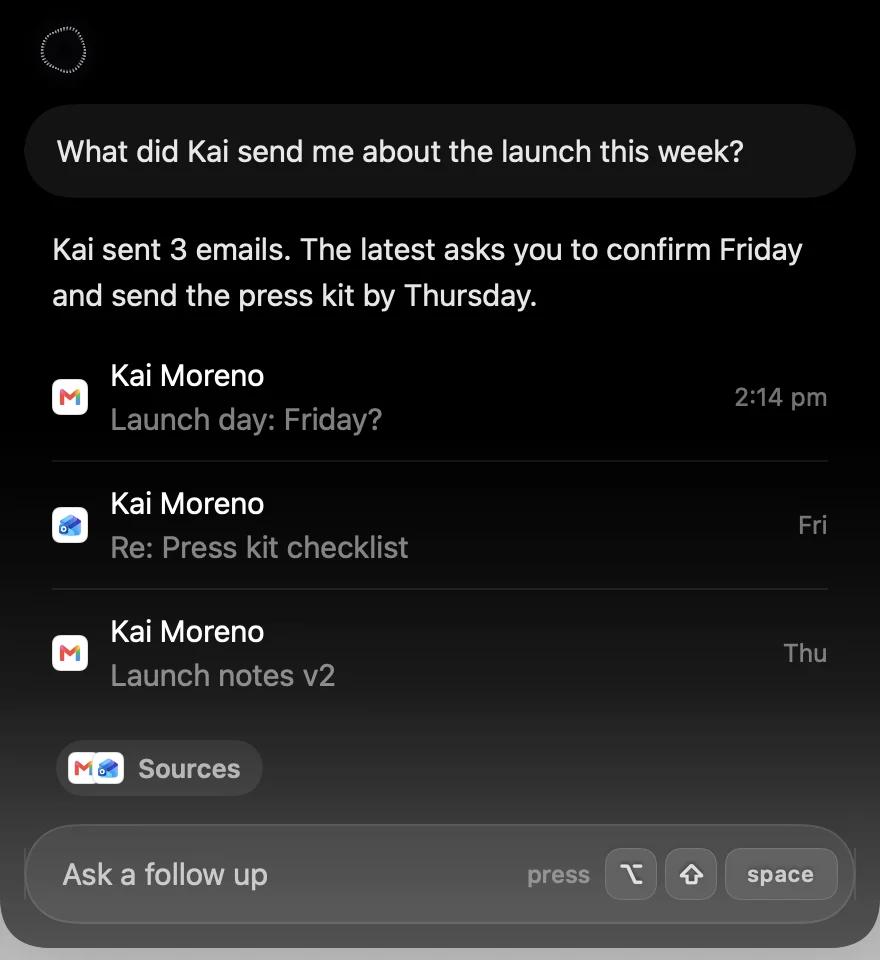
What sets it apart is Ask your apps. Press ⌥⇧Space and ask "what did Kai send me about the launch?", "what's on tomorrow?" or "open my Downloads folder", and the answer appears in the notch with the emails, events or files it found. It works with Gmail, Google Calendar, Outlook, Slack, Notion, GitHub, Linear and 1,000+ more apps, plus Mail, Calendar, Reminders, Notes, Messages, Music and Finder on your Mac. It can act too, with a card to check first and a few seconds to undo. Asking your apps sends your question as text to the AI that answers it; your voice recording stays on your Mac.
Price: Lifetime from $99, or Pro at $12.99 a month. Try Pro free for 3 days. Needs a Mac with Apple silicon and macOS 14.
Wispr Flow: polished dictation on every device
The best known dictation app. It cleans up your words well and runs on Mac, Windows, iPhone and Android, with team plans and meeting notes. Everything is transcribed in the cloud, so dictation needs a connection, and using your dictations to improve its models is on by default on Free and Pro. Its connectors bring Gmail, Calendar and Slack into its meeting notes and questions.
Best for: people who dictate on Windows or their phone as much as on a Mac.
Price: a free plan that slows down after 2,000 words a week, or Pro at $15 a month, or $12 a month billed yearly.
Compare: Wispr Flow alternatives, and Speechy vs Wispr Flow
Superwhisper: local or cloud models, every platform
Many local and cloud models, Modes that run your own AI prompts, meeting recording and file transcription, on Mac, Windows, iPhone and Android with one license. Its docs start you on its own cloud models, and its best local models need Pro.
Best for: people who want deep control over models and prompts, on every device.
Price: a free plan with local Whisper models, Pro at $8.49 a month, $84.99 a year, or $249.99 once.
Compare: Superwhisper alternatives, and Speechy vs Superwhisper
Apple Dictation: free and already installed
Already on your Mac, and free. Press the Dictation shortcut, speak into any text field, and press it again to stop. Some languages are transcribed on your Mac. On macOS 27, Macs with an M3 or later and 12 GB of memory get Apple's newer dictation, which adds punctuation and formatting. There is no custom vocabulary, and it stops after 30 seconds of silence.
Best for: trying dictation before you pay for anything.
Price: free.
Compare: Apple Dictation alternatives, and Speechy vs Apple Dictation
VoiceInk: open source, pay once
Open source under GPL-3.0, with local models on your Mac or an optional cloud service. Streaming models show words as you speak, and you set the language per mode. It is on iPhone too.
Best for: people who want local dictation, the source code, and a small one-time price.
Price: $25 once for one Mac ($39 for two, $49 for three), or free if you build it yourself. Needs macOS 15.
Compare: VoiceInk alternatives, and Speechy vs VoiceInk
Spokenly: free local models
Free when you use its local models, on Mac, Windows, Linux and iPhone. Its default models are in the cloud, and AI cleanup of your text comes through Pro, Apple Intelligence or your own key. On the Mac it can also run quick actions, like opening an app or a website.
Best for: free dictation on many platforms.
Price: free locally, $29 once for Local+, or Pro at $9.99 a month.
Compare: Spokenly alternatives, and Speechy vs Spokenly
MacWhisper: recordings and audio files
Built for transcribing recordings, meetings and audio or video files on your device, with optional cloud providers on your own keys. It has system-wide dictation too, with the better version in Pro. On iPhone and iPad it is called Whisper Transcription.
Best for: transcribing recordings and files.
Price: free, or Pro for €64 once.
The short version
Start with Apple Dictation if you only need occasional dictation, because it is free. Pick VoiceInk or Spokenly for cheap or free local dictation, Superwhisper or Wispr Flow if you need Windows or Android, and MacWhisper for recordings. Pick Speechy if you want your voice to stay on your Mac and one shortcut that also answers from Gmail, Outlook, Calendar, Finder and 1,000+ apps.
Details checked on 20 October 2026 on each app's own site. Prices and features change, so check before you decide.